

Price
Sell now and pick up cash at a Bitcoin ATM


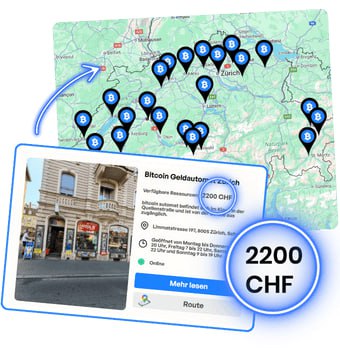
Locate the nearest Bitcoin ATM using the Map, which shows hundreds of Bitcoin ATMs in your area. The map shows the amount of cash available in each Bitcoin ATM, opening hours, and links to Google Maps for navigation.
.png)
.png)
Make sure you've chosen the correct cryptocurrency or network. Also check the miner fee shown on the screen. Then scan the code with your phone using any cryptocurrency wallet.
If you don't want to wait at the Bitcoin ATM, you can sell now on this site and collect the cash later from any Bitcoin ATM. By the time you arrive at the nearby Bitcoin ATM, the transaction should already be confirmed on the blockchain. Learn more about transaction speed here.
.png)
.png)

Once the transaction has been confirmed on the blockchain, scan the second code (barcode) on the receipt. The Bitcoin ATM will then dispense cash. If you have questions about whether the transaction has been confirmed or other issues, you will find contact information for Customer Support on the machine.
*From the above amount you must also deduct the miner's fee (the so-called gas fee), required to validate each USDT transaction on the blockchain and to ensure its correct recording and inclusion in a block. This gas fee is also charged on refunds resulting from a sale.
The miner fee on the TRON network averages $2-4 per transaction. When selling USDT on TRON, remember you also need about 0.10 TRX ($0.015) in your wallet to cover the necessary validation costs.
For USDT on the Ethereum network (ERC-20), the fee averages $1-10. This depends on current gas prices measured in Gwei. On layer-2 networks such as Arbitrum and Optimism the average is about $0.50.
On the Polygon network the fee averages $0.20. The process of verifying and adding a transaction to a block can vary depending on network load. You can check the exact miner fee on the Bitcoin ATM screen or at mempool.space.
NEW!

We offer the simplest way to make cryptocurrency transactions — quickly, intuitively and with low fees.
It prints the codes: QR code at the top and barcode at the bottom (in red).
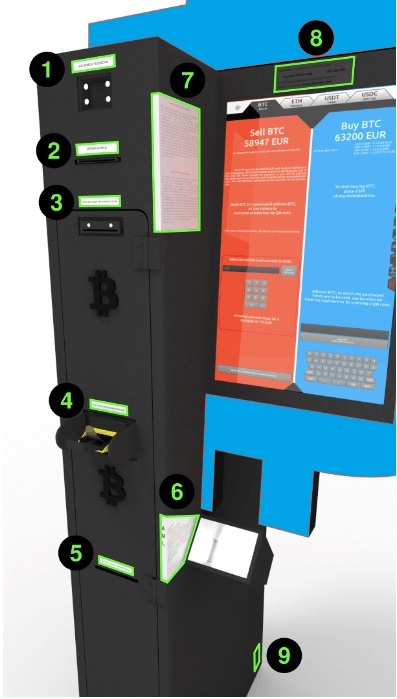
The barcode, located at the bottom, is used to withdraw funds in the national currency. After scanning it in the top part of the device (1), the cash withdrawal process will begin.

The QR code (at the top of the printout) is used to send the cryptocurrency to an address, allowing you to withdraw funds in local currency at a Bitcoin ATM. This code can also appear during sales on the website or on the screen of the Bitcoin ATM. This is the operator’s address. You scan it with your phone with any cryptocurrency wallet to transfer funds and get the barcode (at the bottom).
Newer models allow many banknotes to be inserted at once.
In the event that this component fails, the second bill feeder is marked with the number 5.
If you encounter a problem when selling cryptocurrency for cash, please contact Customer Support. Help in your language is available via phone, email, Telegram and Whatsapp.

Choose from Bitcoin, Ethereum, USDT, USDC, Tron, Litecoin, and Dash. Available networks include TRC20, ERC20, Arbitrum, Optimism, and Polygon. Bitcoin ATMs do not support the Lightning Network.
Below the buy price, the price for each fiat currency accepted for deposit when buying is shown.
Information about how much cash you can withdraw from this Bitcoin ATM. You don't need to visit the Bitcoin ATM to check how much cash it contains. Just use the Bitcoin ATM Map, where this information is provided.
The "Show QR code" button(6) generates an address for depositing the selected cryptocurrency, allowing you to withdraw cash. The address will be displayed on the ATM screen and printed on paper.
Before you press it, make sure you choose the right cryptocurrency and network! Be careful when choosing a cryptocurrency(1) and a transmission network(12), especially with currencies such as USDT or USDC.
Additional option: After pressing, enter the barcode number. If the transaction has already been confirmed on the blockchain, the Bitcoin ATM will dispense cash.
When you insert cash into the ATM, a panel will open displaying the amount of cash you deposited, the value of the cryptocurrency you will receive, and the blockchain network fee. In this section, you can scan the address of your cryptocurrency wallet or enter it manually using the keyboard. Make sure you are sending funds to the right address by checking the cryptocurrency you want to send(1) and the network you are using(8). This is especially true in the case of USDT or USDC. Transferring to the wrong blockchain network can result in loss of funds.
Due to the length of the address, 99% of users scan the address using the QR code. However, you can also enter it here manually using the keyboard.
Choose from 20 available language versions.
Some cryptocurrencies offer transactions on different networks. Select one of them here. Despite the security measures in place, selecting the wrong network may result in the loss of your funds. Bitcoin offers transactions on only one main network, so if you’re interested in a BTC transaction, you don’t need to select a network.
BTC: main network (does not support the Lightning Network)
ETH: ETH, Arbitrum, Optimism, Polygon
USDT: TRC20, ERC20, Arbitrum, Optimism, Polygon
USDC: ERC20, Arbitrum, Optimism, Polygon
Choose another cryptocurrency you'd like to sell for cash. The prices below already include the fee.


.png)