


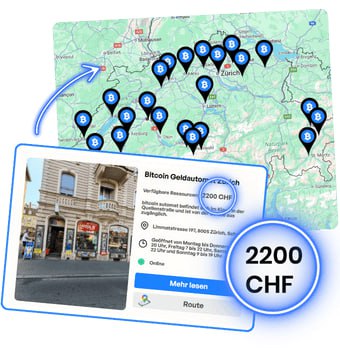
Find a Bitcoin ATM
Use the Rothbard ATM map to check locations, cash availability, hours of operation, and directions.
Click "Show QR"
.png)
.png)
Scan the QR code
Make sure you've selected the correct cryptocurrency and network. Also, check the network fee displayed on the screen. Next, scan the code with your phone using any cryptocurrency wallet.
Wait for confirmation
You can start selling online on this websiteand pick up your cash later at a Rothbard ATM of your choice in Switzerland. Before you leave, check the opening hours and cash availability. Confirmation time depends on network conditions; don’t assume your order will be ready before you arrive. Check your order status.
.png)
.png)

Receive cash
When the transaction is ready for withdrawal, follow the machine’s instructions and scan the barcode to receive your cash. The QR code with the deposit address serves a different purpose. If the status is unclear, you don’t have a receipt, or the machine isn’t dispensing cash, keep any available confirmations and contact Rothbard Support.
The calculator's estimate is approximate. Before confirming the transaction, check the final exchange rate, the amount to be withdrawn, and all fees at the selected Bitcoin ATM.
Before sending funds, check the fee preview in your wallet. The cost may depend on the network and transaction conditions. Make sure the network in your wallet matches the one specified on the Bitcoin ATM.

A Bitcoin ATM is like an ATM, but for Bitcoin!
We offer the simplest way to make cryptocurrency transactions — quickly, intuitively and with low fees.
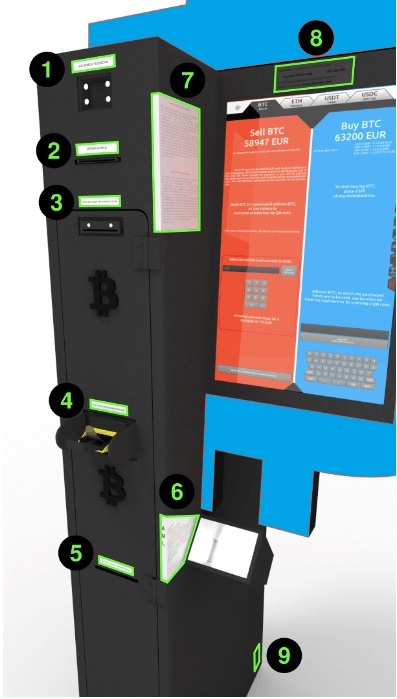

It prints the codes: QR code at the top and barcode at the bottom (in red).
The barcode, located at the bottom, is used to withdraw funds in the national currency. After scanning it in the top part of the device (1), the cash withdrawal process will begin.

The QR code (at the top of the printout) is used to send the cryptocurrency to an address, allowing you to withdraw funds in local currency at a Bitcoin ATM. This code can also appear during sales on the website or on the screen of the Bitcoin ATM. This is the operator’s address. You scan it with your phone with any cryptocurrency wallet to transfer funds and get the barcode (at the bottom).
Newer models allow many banknotes to be inserted at once.
In the event that this component fails, the second bill feeder is marked with the number 5.
If you encounter a problem when selling cryptocurrency for cash, please contact Customer Support. You can find Rothbard's current contact information and support hours on the Contact page.
Sample sales screens on a Bitcoin ATM

Choose from Bitcoin, Ethereum, USDT, USDC, Tron, Litecoin, and Dash. Available networks include TRC20, ERC20, Arbitrum, Optimism, and Polygon. Bitcoin ATMs do not support the Lightning Network.
Below the buy price, the price for each fiat currency accepted for deposit when buying is shown.
Information about how much cash you can withdraw from this Bitcoin ATM. You don't need to visit the Bitcoin ATM to check how much cash it contains. Just use the Bitcoin ATM Map, where this information is provided.
The "Show QR code" button(6) generates an address for depositing the selected cryptocurrency, allowing you to withdraw cash. The address will be displayed on the ATM screen and printed on paper.
Before you press it, make sure you choose the right cryptocurrency and network! Be careful when choosing a cryptocurrency(1) and a transmission network(12), especially with currencies such as USDT or USDC.
Additional option: After pressing, enter the barcode number. If the transaction has already been confirmed on the blockchain, the Bitcoin ATM will dispense cash.
When you insert cash into the ATM, a panel will open displaying the amount of cash you deposited, the value of the cryptocurrency you will receive, and the blockchain network fee. In this section, you can scan the address of your cryptocurrency wallet or enter it manually using the keyboard. Make sure you are sending funds to the right address by checking the cryptocurrency you want to send(1) and the network you are using(8). This is especially true in the case of USDT or USDC. Transferring to the wrong blockchain network can result in loss of funds.
Due to the length of the address, 99% of users scan the address using the QR code. However, you can also enter it here manually using the keyboard.
Choose from 20 available language versions.
Some cryptocurrencies offer transactions on different networks. Select one of them here. Despite the security measures in place, selecting the wrong network may result in the loss of your funds. Bitcoin offers transactions on only one main network, so if you’re interested in a BTC transaction, you don’t need to select a network.
BTC: main network (does not support the Lightning Network)
ETH: ETH, Arbitrum, Optimism, Polygon
USDT: TRC20, ERC20, Arbitrum, Optimism, Polygon
USDC: ERC20, Arbitrum, Optimism, Polygon
How to sell other cryptocurrencies for cash
Choose another cryptocurrency you'd like to sell for cash. The prices below already include the fee.


.png)